Get started
Overview
Better breakout patterns on stocks & crypto, faster, for your code or your agent: what you get and where to start.
TradingPal helps you find better breakout patterns on stocks & crypto, faster. It looks at the entire market for wedges, pennants and triangles that form right before a large run.
Based on research and backtesting, we sift out poorly formed patterns and ones with poor historical results. Each pattern comes with its historical win rate and a suggested entry, stop and target.
The API and the MCP server give your code, or your agent, the same nightly results the site shows: the setups forming on the tickers you track, the two lines to draw for each one, the trigger, stop and target, the track record behind it, past occurrences with outcomes, and a chart image. Nothing is computed per request.
What you get
- An agent that finds breakout formations on your watchlist. Install the plugin in Claude Code, Codex or Cursor, sign in once, and ask what is setting up on your tickers. The agent answers with the setups, the numbers behind them and the disclaimer.
- Imminent breakout alert. Pull the setups on each ticker you track, keep the ones whose trigger price is within a few percent of the last close, and post them wherever you read before the open.
- The trendlines, the trigger, the stop, the target and a finished chart image. Every pattern comes with its two lines as dated price points, the price that triggers the trade, where the stop and the target go, and a PNG with all of it drawn on the candles.
- Win rate and other stats behind every pattern. Sample size, average win and average loss over twenty years of daily bars, for the pattern family and for the ticker, plus every past occurrence on a ticker and how it played out.
GET /tickers/APTV/chart.png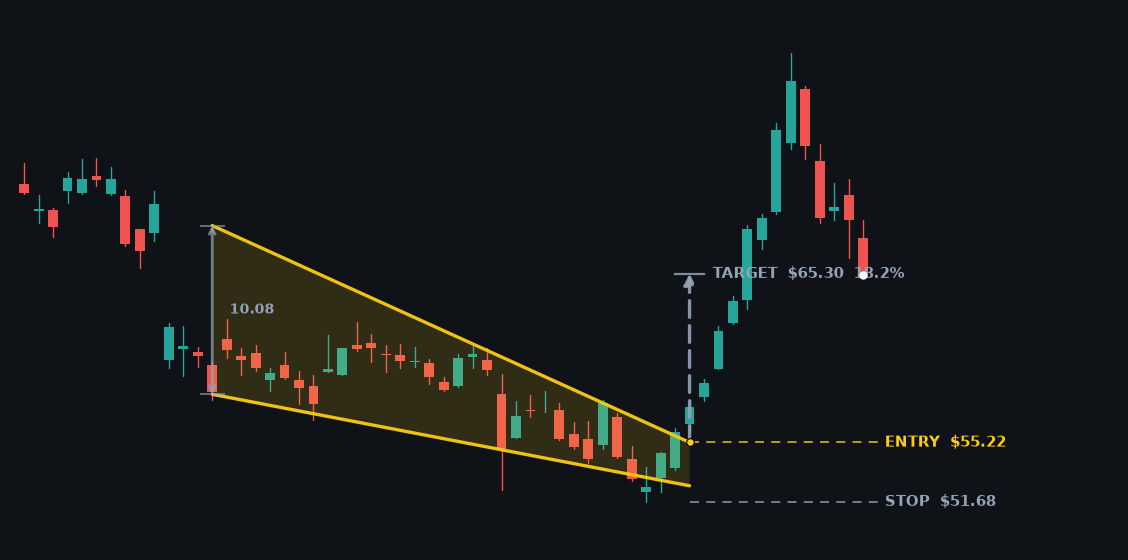
GET /tickers/APTV/patternslines.upper- start
- 2026-04-07 · 68.17
- end
- 2026-05-22 · 55.22
lines.lower- start
- 2026-04-07 · 58.09
- end
- 2026-05-22 · 52.63
plans[0]- trigger
- 55.22
- stop
- 51.68
- target
- 65.30
track_recordtrack_record.family- Win rate
- 56%
- Trades
- 10,683
- Avg R
- +0.52
10,683 resolved trades across 628 stocks & crypto tickers from 1987-01-30 to 2026-07-17; profit factor 1.91.
track_record.ticker- Win rate
- 70%
- Trades
- 10
- Avg R
- +0.67
Start here
1. Paste this into your agent. Claude Code, Codex, Cursor or any agent that can fetch a URL sets itself up from it:
Set up TradingPal pattern access for me: fetch https://tradingpal.io/developers/llms.txt and follow it.
Add the MCP server and tell me when I need to sign in; if TRADINGPAL_API_KEY is set, use that instead.
Then tell me what is setting up on my tracked tickers.
Or install the plugin, add the server by hand, or skip the agent and call the API with a key:
# Plugin: the server plus the skill with the presentation rules
claude plugin marketplace add rendude/tradingpal-plugins
claude plugin install tradingpal@tradingpal
# Or the server alone
claude mcp add --transport http tradingpal https://api.tradingpal.io/mcp
# Then /mcp → tradingpal → sign in
2. Sign in when it asks. The first call opens your browser; you sign in to TradingPal and approve, and the agent is connected. There is no key to copy. Scripts and curl use a key from Keys instead.
3. Ask what is setting up on your tickers. The agent answers with the setups, the numbers behind them and the chart. The Quickstart walks the same path with the tracked-ticker step in between, and the API reference has every route.
How it fits together
| Piece | What it is |
|---|---|
| Keys | Self-serve on this site. A key is shown once and can be revoked any time. |
| Tracked tickers | Your watchlist. The site, alerts, the API and the MCP server read the same list, capped at 50 during the beta. |
| REST API | https://api.tradingpal.io/api/v1, JSON, Bearer key. Twelve routes. |
| MCP server | https://api.tradingpal.io/mcp, Streamable HTTP, the same key and limits, seven tools. |
| Objects | The Setup, Track record, History row, Envelope and Error shapes, field by field. |
| For agents | The rules an agent must follow when it presents this data, and the files agents read. |
Data, in one paragraph
Detection runs after each US session on the daily interval. A setup is forming until its trigger rule fires, then entered carries the entry. Every response says which session it describes in as_of_session, so cache within a day and refetch the next. Every track record carries a summary sentence with the sample size, the win rate, the average win and the average loss, and the rule for anyone presenting the data is to quote it whole: a win rate without its average loss and sample size is the misuse this data exists to prevent.
Try it without a key
The demo answers for a few large caps exactly as the keyed routes would. GET /demo/NVDA, no key, straight from this page: