TrendSpider vs TradingView
TrendSpider vs TradingView: tools, backtests and TradingPal
TrendSpider and TradingView both offer charting, screening and strategy tests. Their tools differ in how you build those tests and connect analysis to a trading workflow. TradingPal is included here for readers who want to inspect predefined technical setups and their historical results.
Typical uses
TrendSpider
Build conditions visually
Use its strategy tester, scanner and automation tools to define and evaluate trading conditions.
TradingView
Customize charts and scripts
Combine chart tools with Pine studies, community scripts and supported broker connections.
TradingPal
Read an existing setup record
Inspect the platform’s qualifying patterns, trade levels and historical outcomes.
TrendSpider vs TradingView vs TradingPal
Official TrendSpider and TradingView feature and pricing pages were checked September 11, 2026. Displayed competitor rates are promotions; billing terms, taxes and add-ons can change the total. TradingPal is not affiliated with or endorsed by either company.
TradingPal's setup statistics are historical simulated results under defined rules, with wins and losses in the record. They are not live performance, a prediction, or a guarantee of what the next setup will do.
Sources: TrendSpider pricing · TrendSpider Strategy Tester · TradingView pricing · TradingView auto chart patterns
Choose using a representative task
Take one trading idea you actually want to examine and work through it in the platforms under consideration. Check whether you can express the rules, use the required history and understand the reported trades. That exercise reveals practical limitations that a feature count can miss.
How you define the analysis
For a rule combining several technical conditions, TrendSpider’s visual strategy tools let you specify conditions for testing. It also supports custom JavaScript indicators. TradingView provides Pine Script and a library of built-in and community studies.
TradingPal supplies the setup definitions. You select a supported pattern or setup family, inspect the chart and review the available record. Customizing those definitions is outside the research subscription.
Compare the rules and the available history
A backtest needs an entry, an exit and a historical sample. Before comparing results between tools, check that the strategy, interval, instrument, costs and fill assumptions match. Different defaults can create different results from similar-looking charts.
TradingPal’s record measures its own rules. Use its methodology and completed trades to decide whether those rules answer your question. A different exit policy needs a separate test.
Free access, trials and billing
At the September 11, 2026 check, TrendSpider listed a 14-day Standard trial for $19 and a Standard annual promotion equivalent to $51.30 per month for the first year. Usage limits and add-ons vary by plan.
TradingView Basic and TradingPal Free provide ongoing free access. TradingView’s paid limits cover items such as charts, indicators and alerts. TradingPal Premium adds the full scanner, historical replay, five Morning Brief picks and followed-symbol alerts. Review the official plan pages for current terms.
Decide whether a predefined setup answers your question
If the question requires your own indicator, entry condition or automated execution, evaluate the relevant TrendSpider and TradingView tools. Their strategy-building and connection features are part of that decision.
If you want to examine TradingPal’s patterns and their stated historical rules, its scanner and replay provide that material directly. You can use them alongside another platform for the rest of your analysis.
Inspect the rules behind the displayed result
This TradingPal panel shows historical trade and account statistics for its defined setups. Review the sample and methodology before comparing it with a strategy you have built elsewhere.
The complete backtesting methodology explains portfolio caps, 25-run medians, cost stress, and limitations.
A Scanner Setup and Its Historical Record
Price is compressing into a continuation pattern with an upside measured move.
Track-record sample: Jan 2018 – Mar 2026. Updated April 21, 2026.
Keep comparing
Compare charting, screening and backtesting features in these related guides.
Frequently asked questions
How should I choose between TrendSpider and TradingView?
Try building a representative rule in each. Compare TrendSpider’s visual strategy workflow with TradingView’s Pine tools, then check data coverage, limits and any broker connections you need.
Which has free access?
TradingView Basic and TradingPal Free provide ongoing free access. TrendSpider’s paid platform listed a 14-day paid trial at the September 11, 2026 check.
Can both platforms backtest?
Yes. TrendSpider provides a strategy tester with visual conditions, while TradingView tests built-in, community or custom Pine strategies.
Why include TradingPal?
It provides historical records for predefined technical setups. That is relevant when you want to inspect those rules without building a custom strategy.
Do TradingPal’s public research tools execute customer trades?
The public charting and research subscription does not provide customer broker execution. Its historical setup records report simulated outcomes.
See It Work — for Free, Every Day.
We post real pattern calls and breakdowns on X — like this June SPY slide, called move by move as it played out. Every call names the level that would prove it wrong, and every call stays up — wins and losses.
Follow @TradingPalHQ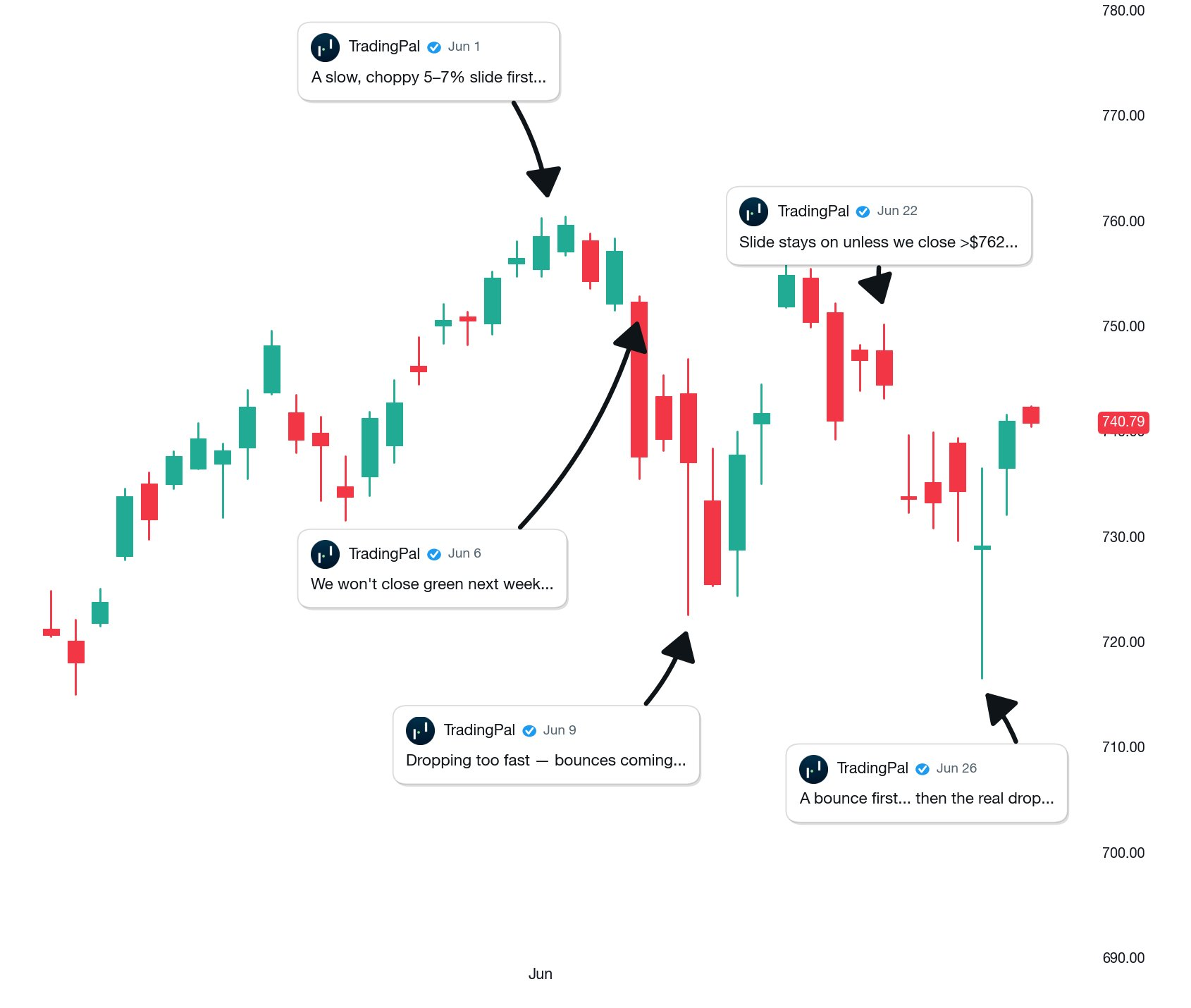 Posted Jun 30, 2026 · open the post to verify
Learn the patterns behind the numbers
The pattern guides explain how to recognize each setup and define its entry and exits. The metrics guides explain how to read its historical results.
See a Qualifying Setup and Its Record
Open a chart free to explore its automatic lines and any qualifying setup available for that symbol. Upgrade when you want the supported universe of 2,600+ symbols scanned nightly.